
How to Digitise Photo Slides: Methods Measured, and Rescuing Faded Agfa Transparencies
 Maria C
By Maria C, slide and film technician at the EachMoment UK lab · Updated October 2026
To digitise slides, scan them yourself on a dedicated film scanner or a flatbed with a transparency lid, or post them to a lab. A phone or handheld gadget is fine for a quick preview but resolves less than a third of the detail. EachMoment scans 35mm slides on a Nikon Super Coolscan 9000 ED from £0.79 per slide, falling to £0.40 by volume.
Faded Agfa transparencies are the hardest case. Agfacolor and Agfachrome slides lose their yellow dye fastest (a median 32% in our measurements) while their cyan thins and the magenta dye survives, so they turn purple. A 16-bit scan with the colour channels rebuilt one by one recovers them; a gadget or an auto-colour button does not.
Key takeaways
- Slide film needs a scanner with a density range (Dmax) of at least 3.6. Printer scanners have no backlight and reach only 2.1, which is why slides come out as dark blobs.
- Measured on a 35mm slide: handheld gadget 24 lp/mm, auto-feed magazine scanner 28, Epson V850 Pro flatbed about 45, Nikon Coolscan 9000 ED 76.
- Agfacolor and Agfachrome slides (1952–1978) lose yellow dye fastest — median 32% in our corpus — and cyan thins while magenta holds on, which is why they turn purple.
- Kodachrome barely fades in the dark (median 4% loss); early Ektachrome loses cyan (28%) and goes red.
- Above about 30% loss in the weakest dye layer, colour cannot be fully rebuilt — scan faded Agfa slides sooner rather than later.
The four ways to digitise slides (and what each really delivers)
There are four realistic ways to digitise slides in the UK, and they differ far more than the marketing suggests. We put a USAF-1951 resolution target slide through each one; these are the numbers.
1. Phone app or handheld slide gadget
Handheld gadgets cost £20–£170. They capture a fixed 8-bit JPEG, use auto exposure, and have no infrared dust removal. We measured their resolving power at 24 lp/mm; auto-feed magazine slide scanners do little better at 28 lp/mm. They are fine for triage (deciding which slides matter), but not for archiving. A phone photographing a slide on a lightbox is in the same class: good for a preview, nothing more.
2. Your printer's scanner (all-in-one)
An all-in-one printer scanner has no backlight, and slides need light shone through them, not bounced off them. We measured them at about 480 dpi effective on a slide, and they hit a Dmax of 2.1 versus the 3.6 that slide film requires. The verdict: this is simply not a slide scanning method.
3. A flatbed with a transparency lid
Flatbeds like the Epson Perfection V850 Pro state 6,400 dpi on the box, but it measures about 2,300 dpi on a 35mm slide, which caps it at roughly 45 lp/mm. The claimed Dmax is 4.0. This method is good for medium format film, but slow for a full carousel because you load a holder of a few slides at a time, then re-scan, then edit.
4. A dedicated film scanner or a lab
Our lab scans every 35mm slide on the Nikon Super Coolscan 9000 ED: 4,000 dpi nominal, 3,900 dpi measured, 76 lp/mm and a rated Dmax of 4.8. Nikon discontinued it in 2009, so today it is a second-hand or lab machine. A 35mm slide scanned at 3,900 dpi yields about 20 megapixels, which is enough for a print of about 47 cm on the long edge at 300 ppi.
Handheld USB slide gadget
The £20–£170 'slide-to-JPEG' gadgets sold online
Current consumer
- 24 lp/mm measured on a 35mm slide
- Fixed 8-bit JPEG, automatic exposure
- No infrared dust removal
- Faded Agfa casts baked into the file
All-in-one printer / CIS scanner
What most homes already own
Current consumer
- About 480 dpi effective on a slide
- Dmax 2.1 — slide film needs 3.6
- No backlight: slides read as dark blobs
- Not a slide method at all
Epson Perfection V850 Pro
The best consumer flatbed with a transparency lid
Current
- 6,400 dpi on the box, ~2,300 dpi measured
- ~45 lp/mm on a 35mm slide (2,300 dpi limit)
- Claimed Dmax 4.0
- Good for medium format; slow for a full carousel
Nikon Super Coolscan 9000 ED (our lab)
Dedicated film scanner we use for every 35mm slide
Discontinued 2009 — lab use
- 4,000 dpi nominal, 3,900 dpi measured
- 76 lp/mm on a 35mm slide
- Rated Dmax 4.8
- 16-bit capture + infrared dust removal on Agfachrome and Ektachrome
Measured comparison: slide digitising methods side by side
The same methods, plus the auto-feed magazine scanner, measured on the same 35mm slide:
| Method | Typical cost | Measured resolving power | Density range (Dmax) | Dust removal | Best for |
|---|---|---|---|---|---|
| Handheld USB slide gadget | £20–£170 to buy | 24 lp/mm | not published | None | Quick preview / triage |
| All-in-one printer scanner | Already owned | about 480 dpi effective | 2.1 | None | Not suitable for slides |
| Auto-feed magazine slide scanner | Bought new | 28 lp/mm | not published | Usually none | Bulk previews |
| Epson Perfection V850 Pro flatbed | Costly to buy new | about 45 lp/mm (2,300 dpi) | 4.0 (claimed) | Infrared (Digital ICE) | Medium format, small batches |
| Nikon Super Coolscan 9000 ED (lab) | £0.79 per slide, down to £0.40 by volume | 76 lp/mm (3,900 dpi) | 4.8 (rated) | Infrared on Agfachrome and Ektachrome | Whole collections, faded slides |
Density range (Dmax) decides whether a slide scan works at all, because slide film is dense. The darkest parts of a slide need a scanner that can see into a density of 3.6. Below that figure, shadows go solid black and faded slides lose the little original dye that is left.
Faded Agfa transparencies: why they turn purple, and how the colour is rescued
If your inherited slides have turned purple, they are almost certainly Agfa. Agfacolor arrived in 1936, and Agfacolor and Agfachrome slide film was sold widely in the UK from the 1950s to the 1970s, so it turns up in a large share of the family collections we receive.
A colour slide is built from three dye layers. Each one blocks one colour of light: yellow dye blocks blue, magenta blocks green, cyan blocks red. On Agfa stocks the yellow dye is the least stable and the cyan dye thins too, while the magenta dye is the most durable. With less yellow, extra blue light comes through; with thinner cyan, extra red comes through; magenta still blocks the green. Blue plus red with no green is exactly the purple-magenta cast you see. Skies go violet, skin goes pink-lilac, and greens go grey.
We measured each dye layer by densitometry on 1,860 35mm slides that had been stored in ordinary homes, and recorded the loss in the weakest layer of each stock. In that corpus, Agfacolor and Agfachrome slides from 1952–1978 (690 slides) had lost a median 32% of their yellow dye. Early Ektachrome 1959–1982 (630 slides) lost a median 28% of cyan. Meanwhile, Kodachrome 1958–1985 (540 slides, stored dark) lost a median of only 4%.
A purple Agfa slide cannot be fixed with a simple auto-colour button because the loss is uneven across the three layers and across highlights versus shadows. The right fix requires per-channel reconstruction. We scan in 16-bit so the faint yellow layer survives as data, then rebuild each colour channel separately: mainly pulling back the blue channel where yellow has gone and the red channel where cyan has thinned, using neutral references (a white wall, a grey road, clouds) to set the balance.
There is a threshold at about 30% density loss. Once the weakest dye layer has lost more than about 30%, the colour can no longer be fully rebuilt per channel. The scan still recovers detail, but the colour becomes an informed reconstruction rather than a restoration. The median Agfa slide in our corpus had already lost 32%, so more than half the Agfa slides we see are already past that line. That is why faded Agfa slides should be scanned sooner rather than later — fading continues even when stored in a box.
Dust is the one easy part. Agfachrome and Ektachrome are chromogenic dye films whose dyes let 89–94% of the infrared scanning channel through, so infrared dust removal (Digital ICE) works reliably on them. On Kodachrome it is unreliable, so Kodachrome slides are cleaned by hand at our lab.
If you want to convert a few Agfa transparencies yourself, three things matter: scan in 16-bit with the scanner’s automatic colour correction switched off, set levels on each colour channel separately from something that should be neutral, and save a TIFF rather than a JPEG. Some hobbyists also invert the tone curves and run purple Agfachrome through negative-conversion software. Both work on a handful of frames, but they cost hours per slide and need a scanner with real Dmax. You can read more about how Ektachrome and Agfachrome fade differently or why Kodachrome scans look so different.
Faded Ektachrome: the red shift
Early Ektachrome slides lose cyan, meaning the picture goes red, orange, or magenta. The same 16-bit capture and per-channel rebuild process we use for Agfa applies; the weakened layer is simply cyan instead of yellow.
What happens to a faded slide at our lab, step by step
- Raw 16-bit capture on the Coolscan (cast and dust visible).
- Infrared dust removal plus density set from the slide's own shadows and highlights.
- Per-channel reconstruction of the faded dye layers (yellow and cyan on Agfa, cyan on early Ektachrome).
- Final file: neutral colour, checked by a technician.
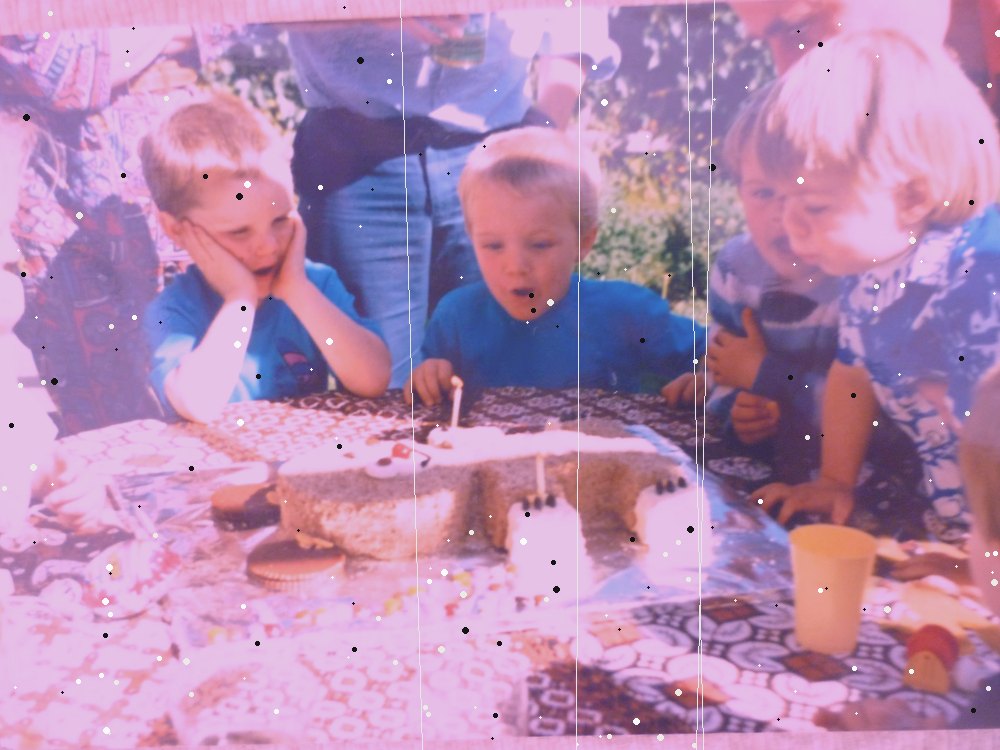
1. Raw 16-bit capture — the purple cast and dust exactly as the film holds them.
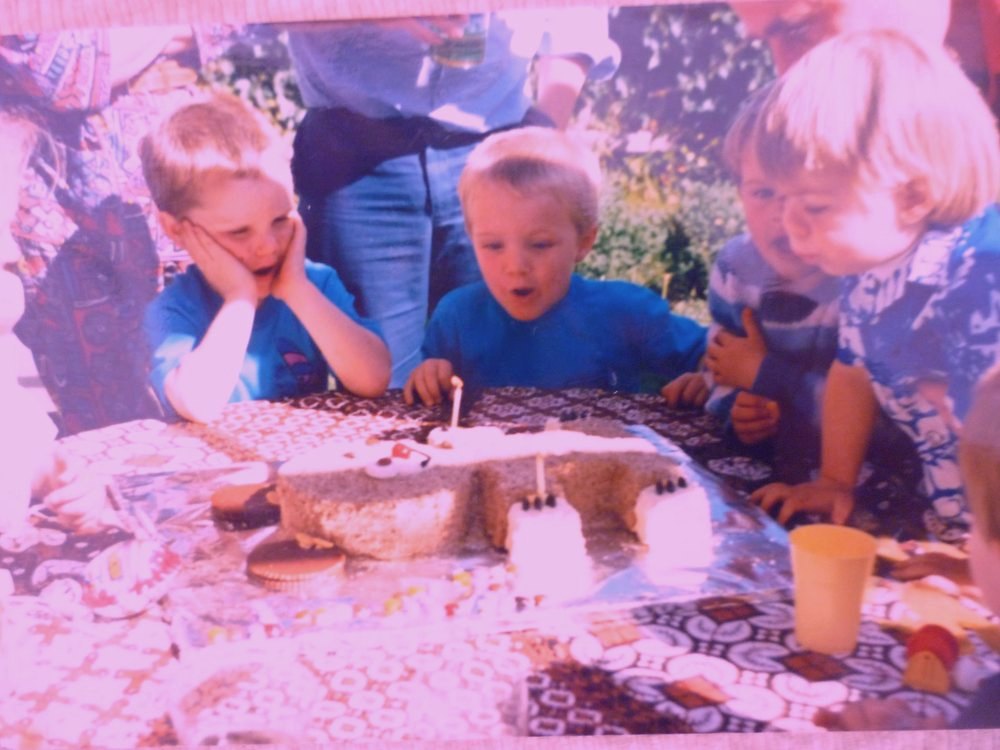
2. Dust removed, density set — infrared dust removal, with black and white points taken from the slide’s own shadows and highlights.
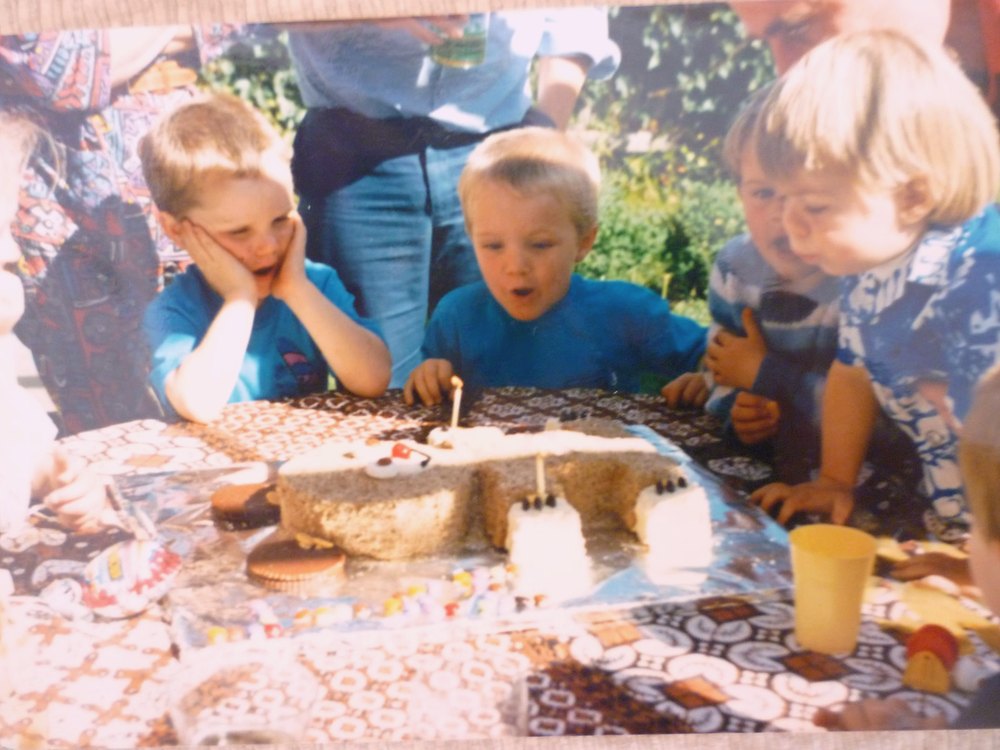
3. Faded layer rebuilt — the thinned yellow and cyan layers rebuilt separately against the surviving magenta.
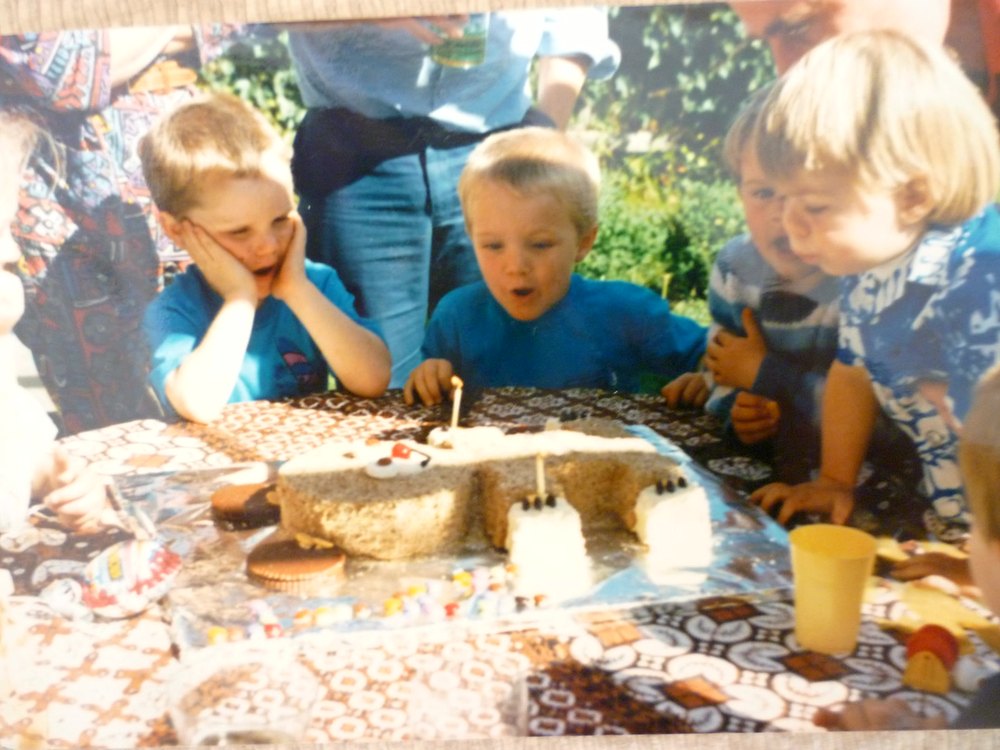
4. Final file — neutral colour, checked by a technician before it goes in your download.
How to prepare your slides before digitising them

- Leave slides in their mounts. Card, plastic, and glass-mounted slides are all fine; we handle them.
- Don't wipe the emulsion with a cloth or use household cleaner; blow off loose dust only. We have a guide on cleaning old slides safely.
- Keep carousels and boxes in order. Write a label on each box with the place and year — we keep the order exactly as provided.
- Pull out the faded Agfa boxes and put them first: they are the most at risk of crossing the 30% line.
- Store the originals cool and dry afterwards. Roughly every 5–7 °C cooler halves the rate of dye fade.
What does it cost to digitise slides in the UK?
Taking the DIY route means spending £20–£170 on a gadget, or several hundred pounds for a flatbed scanner, plus your own time. Using our slide scanning service costs nothing up front and needs none of your evenings.
Our lab prices at EachMoment are based on volume: £0.79 per slide; 95+ slides £0.71; 190+ £0.67; 317+ £0.63; 633+ £0.55; 1,266+ £0.47; 1,518+ £0.40. These volume rates apply when the box comes back to us within 4 weeks of dispatch.
For worked examples: scanning a full Kodak Carousel 80 (80 slides) at £0.79 costs £63.20. A Carousel 140 (140 slides) at £0.71 costs £99.40. A batch of 300 slides is approximately £201 in total. We also offer an optional AI enhancement add-on for £4.99.
You can see current slide scanning prices or get an instant quote based on your exact slide count.
How the Memory Box service works

- Order your Memory Box online.
- Pack your slides (mounts on, in order) and post it back to us.
- We scan every slide on the Coolscan, fix colour casts, and send you a download link; the originals come back to you.

EachMoment is rated 4.7 on Trustpilot. We have served tens of thousands of customers and digitised over one million items.
Ready to digitise your slides?
Order a Memory Box, pack your slides in their mounts and post them to our UK lab. Faded colour casts are treated as standard.
Start your slide order →Frequently asked questions
How do I digitise old slides at home?
At home you need light shining through the slide: a handheld slide gadget (£20–£170) or a flatbed with a transparency lid such as the Epson Perfection V850 Pro. Printer scanners do not work. A gadget resolves 24 lp/mm and the V850 about 45 lp/mm, against 76 lp/mm on a dedicated film scanner, and both lose shadow detail on dense slides.
Can faded Agfa slides that have turned purple be restored?
Yes, with one honest limit. Faded Agfa slides turn purple because the yellow dye has weakened most and cyan has thinned while magenta survives; across 690 Agfacolor and Agfachrome slides we measured a median yellow loss of 32%. A 16-bit scan with each colour channel rebuilt against neutral references recovers the detail on all but physically damaged slides. Colour is fully restorable while the weakest layer has lost under about 30%; beyond that, it is an informed reconstruction, which is why scanning sooner matters.
What resolution should slides be scanned at?
The archival standard is 4,000 dpi on a dedicated film scanner, yielding about 20 megapixels from a 35mm slide. Flatbeds advertised at 6,400 dpi resolve about 2,300 dpi when measured, so the number on the box is not the number in the file.
Is it cheaper to digitise slides myself or use a service?
It depends on volume. A good flatbed costs several hundred pounds, and gadgets cost up to £170 but provide poor quality. A lab such as EachMoment charges £0.79 per slide, falling to £0.40 by volume, so a full Carousel 80 costs £63.20 with no hardware to buy and no evenings spent scanning.
Do I need to take slides out of their mounts before scanning?
No. Leave slides in their card, plastic or glass mounts and keep them in their boxes or carousels in order. Our technicians handle every mount type, including glass mounts, which jam most consumer scanners.
Why do my slides look purple or red?
Slides look purple when the yellow dye fades fastest, the cyan thins and the magenta dye survives, which is very common with Agfacolor and Agfachrome slides. Early Ektachrome slides lose their cyan dye, so they look red, orange or magenta. Kodachrome stored in the dark barely fades: a median 4% loss in our measurements.


