
How to Scan Old Newspaper Clippings (UK): Avoiding Moiré Patterns on Flatbeds
 Maria C
To scan old newspaper clippings, use a flatbed (not a feeder) at 600 dpi in colour with descreening switched on, back the clipping with black card, save a TIFF master — and never shrink the file without blurring the dot pattern first. Newspaper photographs are not continuous-tone pictures: they are printed as a grid of ink dots, and a flatbed on the wrong settings turns that grid into wavy, tartan-like moiré.
Knowing how to scan old newspaper clippings comes down to one number: newsprint is printed on a screen of roughly 85 lines per inch (lpi). In October 2026 our UK lab ran a simulated moiré bench on an 85-lpi, 45° newsprint halftone. 150 dpi scored 31.7 on our moiré index, 300 dpi scored 1.6 — and the worst result of all, 77.1, came from a clean 600-dpi scan that was simply shrunk without descreening.
Key takeaways
- Newspaper photographs are halftones: ink dots on a screen of about 85 lpi at 45°. Moiré is the scanner's pixel grid beating against that dot grid.
- On our simulated October 2026 bench, 150 dpi scored 31.7 on the moiré index; 300 dpi scored 1.6. Scan at 300 dpi minimum (twice the screen ruling is not enough) and 600 dpi for an archive master.
- The biggest moiré came from shrinking a clean 600-dpi scan without descreening (77.1). Descreening first held it at 1.1. Judge scans at 100% zoom.
- Use a flatbed, never a sheet-feeder; back the clipping with black card; scan in colour; keep a TIFF master; descreen photographs but not text-only columns.
- Glued scrapbooks and fragile cuttings are safer on an overhead rig: about 4 seconds per A4 page at an effective 300 dpi, with no pressure on the spine.
Why newspaper clippings turn into moiré on a flatbed
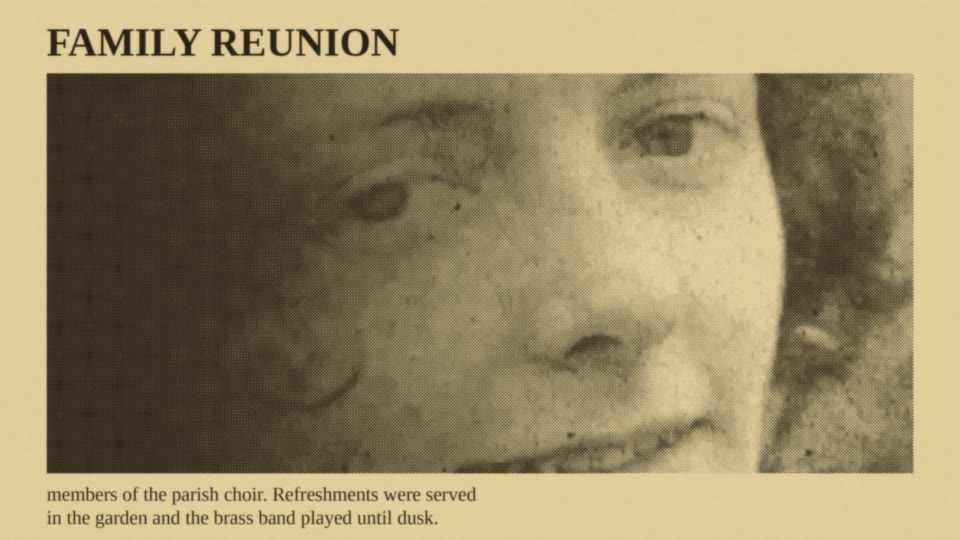
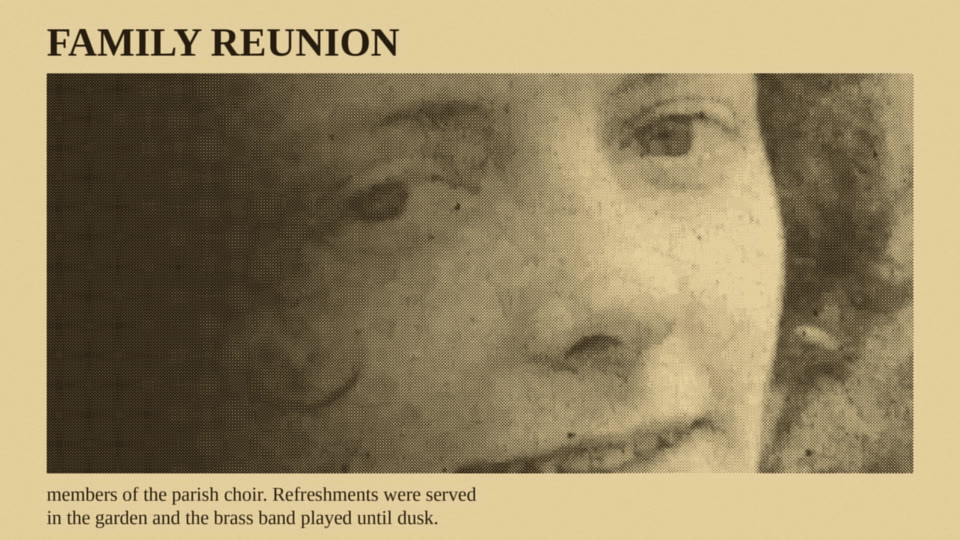
Newspapers print photographs as a halftone. This is a grid of ink dots of varying sizes, typically printed at an 85-lpi screen with the dots set on a 45° angle. Magazines on coated paper use finer screens, up to 185 lpi, but the principle is identical. Every newspaper photograph you have ever seen is a dot pattern, not a continuous-tone image.
The first printed halftone photograph appeared on 30 October 1869 in the Canadian Illustrated News. Later, a New York paper, the Daily Graphic, ran a full-tonal-range halftone on 4 March 1880. British dailies took up halftone photographs around the turn of the 20th century, so almost every newspaper photograph in a family scrapbook, from Edwardian cuttings to 1990s local papers, is built the same way.
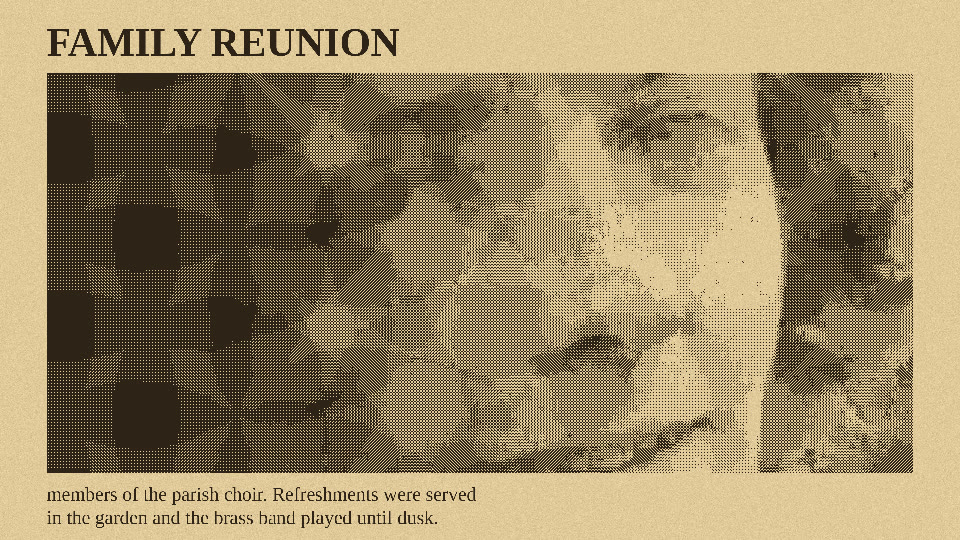
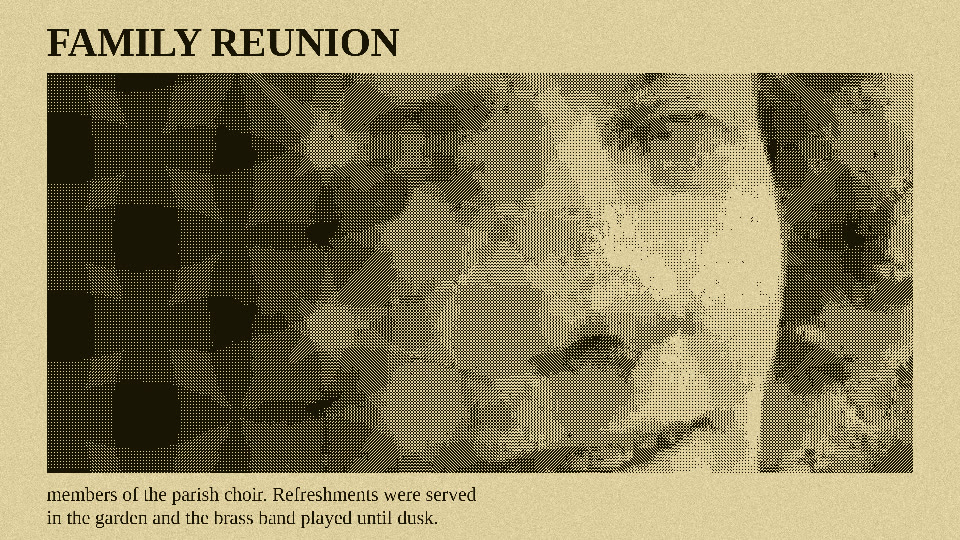
When you place a halftone on a scanner, you combine two regular grids: the scanner's pixel grid and the paper's halftone dot grid. The clash creates moiré. Moiré is the wavy, plaid, or tartan interference pattern that obscures the faces and details in the image. You see exactly the same phenomenon when filming a television screen or a striped shirt on camera.
It's aliasing, not damage
Moiré is a form of aliasing. It is a mathematical interference pattern, not a physical defect in the paper. The clipping is perfectly fine. The scanner is perfectly fine. You are looking at the beat frequency generated when two grids fall out of step. This is entirely avoidable once you understand the relationship between the screen ruling and your scan resolution, much like the related texture-pattern problem on silk and lustre prints.
Our moiré bench: which DPI actually works
In October 2026, our EachMoment lab built a first-party moiré bench to measure exactly what happens when you digitise newsprint. We rendered an 85-lpi, 45° newsprint halftone tint with 30% ink coverage. We then simulated an area-sampling flatbed sensor at multiple resolutions. We calculated the resulting moiré index, which represents the peak-to-peak low-frequency brightness swing as a percentage of full scale. A lower score indicates a cleaner scan.
The textbook rule is to scan at least twice the screen ruling (2 × 85 = 170 dpi), but our bench shows that floor is too low: 200 dpi still scored 5.5, with visible banding. Use 300 dpi as the minimum (about 3.5 times the screen ruling) and 600 dpi for an archive master. Every result from 300 to 2,400 dpi sits between 1.6 and 2.9, below the point where moiré is visible, so 600 dpi is not cleaner than 300 dpi — it gives you headroom for cropping, OCR and descreening. At 150 dpi the dots alias into a pattern you can see across the whole picture.
| Scan resolution | Moiré index | What you see |
|---|---|---|
| 150 dpi | 31.7 | Severe (the default email/document preset on many home scanners) |
| 200 dpi | 5.5 | Visible banding |
| 300 dpi | 1.6 | Clean image |
| 600 dpi | 2.4 | Dots fully resolved |
| 1,200 dpi | 2.7 | Dots fully resolved |
| 2,400 dpi | 2.9 | Dots fully resolved |
The resize trap
The surprise finding from our lab is that the biggest source of moiré is not the scan itself, but shrinking the file afterwards. We took a perfectly clean 600-dpi master and downsized it to 100 ppi for email and web use with a basic resize tool. It scored 77.1 on the moiré index. That is the worst result we recorded — worse than any scan resolution.
We then took the exact same file, applied a gentle descreen (a blur of about half a halftone cell) BEFORE downsizing it. That file scored 1.1. The pattern was gone. Many people believe their scan is ruined when they look at the thumbnail on their computer monitor. When your image viewer shrinks the scan to fit the screen, it resamples the dots without descreening them and creates moiré that is not in the file. Always zoom to 100% before judging the quality of a newspaper scan.
How to scan old newspaper clippings step by step
This is the minimum correct workflow for a flatbed at home. It captures the full dot detail without introducing interference.
- Prepare and flatten. Carefully unfold the clipping. Do not press the scanner lid down heavily on folded or brittle clippings, as the pressure cracks the newsprint.
- Clean the glass. Dust and paper fibres ruin scans. Wipe the flatbed glass with a lint-free cloth before starting.
- Use a black card backing. Place a sheet of black card behind the clipping to stop show-through of the reverse page. Newspaper is highly translucent.
- Set resolution and colour mode. Select 600 dpi and choose colour (either 48-bit or 24-bit). Scan in colour even for black-and-white newsprint to capture the natural yellowing; use greyscale 16-bit only if file size matters immensely. Avoid "text" or "document" presets: many drop to 150 dpi or pure black-and-white, which wrecks newspaper photographs.
- Decide where descreening happens. At 600 dpi the raw scan is already clean (2.4 on our bench), so keep the master raw and descreen the copies you make from it. If you only want one quick file at 300 dpi, tick the Descreening checkbox in your driver (Epson Scan 2 has one). Never descreen text-only columns, as it softens type.
- Preview at 100%. Check your preview by zooming in fully. Ignore the moiré on the zoomed-out thumbnail.
- Save a TIFF master. Save the raw, undescreened 600-dpi scan as a lossless TIFF file. This is your permanent archive, and every other file is made from it.
- Export working copies. Create smaller JPEG or PDF copies for sharing. Run OCR (Optical Character Recognition) on the text for searchability, and apply a gentle Gaussian blur of roughly half a dot cell (3–4 pixels at 600 dpi, where one 85-lpi cell is about 7 pixels) before resizing to eliminate residual moiré.
Settings by clipping type
Different forms of printed media require specific adjustments. One preset does not fit every cutting. Read our guide on what DPI you need for family photos for how this compares with ordinary photographic prints.
| Clipping type | Resolution | Colour mode | Descreen | Notes |
|---|---|---|---|---|
| Photo-heavy news page | 600 dpi | Colour | On | Requires black backing card |
| Text-only column | 600 dpi | Colour or 16-bit greyscale | Off | Run OCR after scanning |
| Yellowed/brittle clipping | 600 dpi | Colour | Depends on content | Capture patina; do not press lid |
| Glossy magazine cutting | 600–1,200 dpi | Colour | On | Finer screens (up to 185 lpi) need more dpi |
| Clippings pasted in a scrapbook | 300–600 dpi | Colour | On | Overhead capture protects the spine |
Fixing moiré on a scan you've already made
If you already have a folder full of digital clippings showing severe interference patterns, you have specific repair options. However, note immediately that you cannot fully fix a 150-dpi scan. At 150 dpi the dot information was never captured. You must rescan the physical item.
- The zoom check: Open the file and zoom to 100%. If the moiré vanishes, the file is perfect. The issue is purely your monitor scaling.
- Blur-then-resize: In a photo editor, apply a gentle Gaussian blur (about half the size of a halftone cell), resize the image downward, and then apply light sharpening.
- Dedicated descreen filters: Some photo editors include a descreen filter, and FFT (Fast Fourier Transform) plugins isolate the regular dot grid and remove it.
- The rotation trick: Rescan the clipping, but rotate it a few degrees on the scanner glass. This changes the angle of the beat between the two grids. Straighten the image digitally afterwards.
Brittle, folded and scrapbooked clippings
Newsprint is made from acidic wood pulp, which is why clippings yellow and turn brittle, and that acid migrates into anything it touches. Once scanned, store the originals in acid-free folders away from photographs to prevent contamination. Never press the scanner lid down hard on a folded clipping. Use a weighted sheet of clear glass or acrylic, or leave the lid open in a dark room. Sheet-feeders or auto-document-feeders are strictly banned; their rollers tear and crease brittle newsprint.
Clippings glued into a scrapbook should stay where they are; pressing the book face-down on a flatbed strains the spine. You can learn more about our scrapbook and album scanning process. In our lab, for bound scrapbooks, we use a dedicated overhead rig. It captures an A4 page in about 4 seconds at an effective 300 dpi and puts no pressure on fragile spines.
Home all-in-one printer-scanner
Fine for a handful of text clippings
- Document preset often defaults to 150 dpi, which scored 31.7 on our moiré bench
- Lid pressure can crack folded, brittle newsprint
- Descreen option often missing or hidden
- Never use the sheet feeder on newsprint
Epson Perfection V850 Pro
Lab flatbed for loose clippings and prints
- 6,400 dpi maximum optical resolution
- We scan paper items at 600–1,200 dpi
- About 20 seconds per A4 page
- Descreening applied before any resize
Overhead camera rig
Lab capture for scrapbooks and glued clippings
- About 4 seconds per A4 page
- Effective 300 dpi at A4
- No pressure on spines or brittle pages
- Pages stay in the scrapbook — nothing is peeled off

When to send clippings to a lab instead
If you have a handful of clippings, digitising them yourself with a good flatbed is fine. If you are curious which home scanner we'd buy, see our tests. However, if you possess hundreds of cuttings, glued scrapbooks, fragile 1940s–1970s newsprint, or mixed boxes containing both clippings and photographs, a lab saves you days of work and protects the originals.
In our lab, photographs and paper items are scanned on the Epson V850 Pro flatbed, which features a maximum optical resolution of 6,400 dpi. We run clippings at 600–1,200 dpi. An A4 page takes about 20 seconds on the V850, and descreening is applied before any resized copy is made. The process is simple: order a Memory Box, pack your clippings and scrapbooks, post it to our UK lab, and receive your digital files.
Loose prints start from £0.39 each, falling to £0.23 at volume. If you prefer to have us digitise the whole scrapbook, scrapbook and album pages cost £1.49 per page. We also offer optional AI enhancement from £4.99. Explore our photo scanning service or get a quote for a mixed box. EachMoment is rated 4.7 on Trustpilot, trusted by tens of thousands of customers, with over one million items digitised to date.

Frequently asked questions
What DPI should I scan newspaper clippings at?
Scan at a minimum of 300 dpi for general legibility, and ideally 600 dpi for a permanent archive master. On our 85-lpi bench, 150 dpi scored 31.7 on the moiré index against 1.6 at 300 dpi.
Why do my scanned newspaper photos have a wavy pattern?
It is moiré: the halftone ink dots in the newsprint aliasing against a pixel grid. It comes from scanning below 300 dpi, or from shrinking a good scan without descreening it first, and an image viewer displaying the file below 100% zoom produces it too. Scan at 600 dpi, check at 100% and blur away the dot pattern before resizing.
Should I scan newspaper clippings in colour or black and white?
Always scan in colour (24-bit or 48-bit) to accurately capture the historical yellowing of the paper. You can easily convert the digital file to black and white later, but you cannot restore lost colour data.
Can I scan clippings with a phone instead?
Yes, for capturing plain text or quick reference copies. However, a phone camera also aliases halftones, so shoot square-on in daylight and avoid digital zoom. For newspaper photographs, a flatbed at 600 dpi with descreening gives a cleaner result.
Will scanning damage old newspaper?
A single pass of flatbed light does not harm newsprint. However, sheet-feeders will tear brittle pages, and heavy pressure from a scanner lid will crack folded newsprint.
How should I store the originals after scanning?
Place the original clippings in acid-free folders. Ensure you store them completely separately from original photographic prints to prevent the acid in the newsprint migrating and staining the photos.
Got a scrapbook of cuttings to digitise?
Order a Memory Box, post your clippings and scrapbooks to our UK lab, and we scan, descreen and return them as TIFF and JPEG files.
Order a Memory Box for your scrapbooks →
