
VHS Picture Green or Purple? What the Colour Shift Means and Whether the Tape Is Damaged
 Maria C

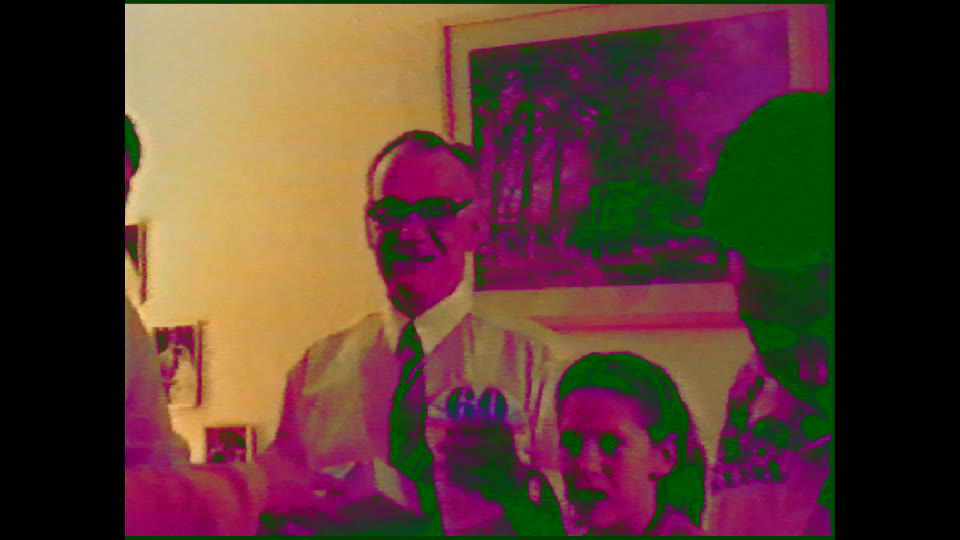
A VHS picture that turns green and purple is almost always a colour-decoding fault, not a ruined recording. If every tape shows the same green shadows and purple highlights, the cause is the connection: a half-seated SCART plug, the TV input set to the wrong mode (RGB, S-Video or composite), a faulty adapter, or a VCR playing an NTSC tape into a PAL-only TV. If only one tape flickers green and magenta, or the colour comes and goes in bands, the colour signal on that tape is weak or worn, and that tape needs careful handling from here on.
Work through the free checks below first. If one tape still shows the fault on two different players, stop replaying it: having that tape transferred professionally is the safer route, because each extra pass over a weak tape wears away the colour you are trying to save.
Key takeaways
- Green and purple on every tape = connection or settings fault (SCART, TV input mode, adapter, PAL/NTSC). The tapes are usually fine.
- Green and purple on one tape only = a weak or damaged colour signal on that tape, or a recording made on a misaligned camcorder.
- Colour that flickers, smears sideways or drops to black and white in patches points to tape wear, mould or dirty video heads.
- All the safe checks cost nothing: reseat the cable, change the TV input setting, try a second tape and a second player.
- Stop if one tape fails on two players. Replaying it can make the fault permanent.
Symptom, likely cause and safe check
| What you see | Most likely cause | Safe check |
|---|---|---|
| Every tape is green and purple, picture otherwise sharp | SCART plug not fully seated, a worn SCART lead, or the TV/AV input set to the wrong mode | Push both SCART ends in firmly; try another SCART lead; set the TV input to AV/composite, then RGB |
| Green and purple only through a SCART-to-HDMI box or USB capture stick | Adapter colour-format mismatch (a very common source of an all-over green/purple picture) | Plug the VCR straight into a TV with SCART or composite; if the colour is right there, the adapter is the problem |
| Picture green and pink, rolling or flickering, on one tape from abroad | NTSC tape on a PAL-only player or TV | Check the cassette label or case for "NTSC"; play it on a multi-system machine |
| One tape only: colour washes out, smears sideways, flickers or shows coloured bars | Weak colour signal on the tape (wear, oxide loss, mould) | Try one other tape on the same VCR. If others are fine, stop playing this one |
| Colour comes and goes, or flips to black and white in patches | Tracking or dirty video heads losing the colour signal | Adjust tracking once; run one clean, known-good tape. Do not use cleaning tapes repeatedly |
| Whole recording has a steady green or purple tint from the first frame | The camcorder recorded it that way (white balance or a fault at the time) | Compare with other tapes from the same camcorder; this is colour correction, not tape damage |
Why VHS colour goes green and purple
VHS records brightness and colour separately. The brightness signal carries the sharp black-and-white picture; the colour information rides on a separate, lower-frequency signal that the VCR has to convert back into a standard PAL colour signal on playback. Your TV then decodes that colour signal. Green sits roughly opposite purple and magenta in the colour signal, so when the decoding goes wrong, or the colour signal is distorted, the picture swings towards one, the other, or both at once: green shadows and skin tones, purple or magenta highlights.
That is why the fault splits so cleanly into two families. If the decoding chain is wrong (cable, input mode, adapter, TV standard), every tape is affected the same way. If the colour signal on one tape is damaged, only that tape shows it, and usually unevenly: flickering, banding or colour that drifts as the tape plays.
Safe checks, in order (stop at step 6 if the fault stays)
- Play a second tape. Pick one you know played normally in the past. If it is also green and purple, the tapes are not the problem; go to step 2. If it plays correctly, skip to step 5.
- Reseat the SCART cable at both ends. A SCART plug that is a few millimetres out still passes a picture but can lose the pins that carry colour correctly. Push it home firmly on the VCR and the TV.
- Change the TV input setting. On most UK TVs, the SCART or AV input has a setting for RGB, S-Video and composite (sometimes called CVBS or Auto). Try each one. A wrong setting here can give a dark, discoloured or colourless picture, so it is worth checking before anything else.
- Take adapters out of the chain. If you go through a SCART-to-HDMI converter or a USB capture stick, connect the VCR directly to a TV instead. If the colour is now right, the adapter is at fault, not the VCR or the tape.
- Check the tape's TV standard. Tapes recorded in the USA, Canada or Japan are NTSC. On a PAL-only VCR or TV they can play in black and white, or with green, pink and flickering colour. That is a playback mismatch, not damage.
- Try the problem tape on a second VCR. Borrow one if you can. If the same tape still shows green and magenta flicker on a second, working machine, stop here. The colour signal on that tape is weak, and every further play takes some of it away.

Avoid the fixes people suggest on forums for this stage: repeated cleaning tapes, opening the cassette, or running the tape through fast-forward and rewind to "loosen" it. If you see white or grey fluffy spots on the tape edge, that is mould; read what a lab does with tracking lines and dropout before transferring before you play it again.

Is the tape damaged? How to tell
A tape is likely damaged when three things are true: the fault appears on that tape only, it follows the tape to a second player, and it changes as the tape plays (flickering, colour bands, colour that smears to the side or drops out). Wear, oxide shedding and mould weaken the colour signal as well as the picture, so a tape with unstable colour on two players is giving you an early warning, even if the picture still looks sharp.
A tape is probably not damaged when the colour cast is steady from the first frame to the last, or when every tape looks the same. A steady green or purple tint throughout one recording usually came from the camcorder on the day: wrong white balance, or a camera fault. The tape faithfully stores what it was given, and the cast can be corrected in the digital file.
When a lab transfer is the safer option
Choose a professional transfer when one tape still shows green and magenta flicker on two working players, when you can see mould or shedding, or when the tape is the only copy of something you cannot record again. At that point the goal is to play it as few times as possible, on a clean, working machine, and capture it in one careful pass.
At our European lab, VHS tapes are played on consumer VHS recorders that are kept in service, mainly Panasonic DMR-EZ48V/EZ49V and Philips VR1000/VR1100, with Sony SLV and JVC models to cross-check a stubborn tape. Camcorder formats such as Video8, Hi8 and Digital8 go through Sony Digital8 Handycams. Inspection, cleaning and repair are included; mould treatment and repairs to snapped tape cost a small extra charge per item, shown before you pay.
Panasonic DMR-EZ48V / EZ49V
Consumer VHS recorder
PAL VHS
- Plays PAL VHS recordings
- VHS-C with an adapter
- Clean heads before every job
Philips VR1000 / VR1100
Consumer VHS recorder
PAL VHS
- A second make to rule out a player fault
- Plays SP and LP recordings
Sony SLV and JVC recorders
Consumer VHS recorders
PAL VHS
- More machines to cross-check a stubborn tape
Sony Digital8 Handycam (DCR-TRV)
Camcorder playback
Video8 / Hi8 / Digital8
- For camcorder tapes that show the same colour faults
Our service, briefly. If you choose a lab transfer: order a Memory Box, pack your tapes, and send them by tracked courier. VHS transfer is £14.99 per tape before volume discounts. Your files arrive in a private Cloud Album, and the tapes come back to you. Turnaround is around 9–10 weeks, counted from the day your payment clears once your box is back with us; rush processing is available. See VHS to digital pricing and how ordering works.

Related VHS picture faults
- Colour gone completely: VHS playing in black and white or tracking badly
- Bent or torn strip along the bottom: head-switching noise explained
- Black screen through a capture stick: six fixes for a USB capture with no signal
Frequently asked questions
Why is my VHS picture green and purple on every tape?
When every tape shows the same cast, the cause is the connection, not the tapes. Reseat the SCART plug at both ends and change the TV's AV input between RGB, S-Video and composite. If you use a SCART-to-HDMI box or a USB capture stick, try connecting the VCR straight to a TV.
Why does only one VHS tape play green and pink?
If one tape is green and pink and the others are fine, either that tape is NTSC (recorded outside Europe) or its colour signal is weak from wear or mould. Check the label for NTSC. If it is PAL and fails on two players, stop playing it and have it transferred.
Can a green and purple VHS picture be fixed in the digital copy?
A steady colour cast that runs through the whole recording can be corrected in the digital file. Flickering or smeared colour from a worn tape is harder; the best result comes from playing the tape once on a clean, working machine rather than repeatedly at home.
Will a head-cleaning tape fix VHS colour problems?
Occasionally, if the heads are dirty, but use one at most once. Abrasive cleaning tapes wear the heads, and if the fault is on the tape itself, cleaning the VCR will not help.
Does a green VHS picture mean the tape is ruined?
Usually not. Most green and purple pictures come from cable or settings faults. Even a tape with a weak colour signal normally still holds a usable picture, which is why it is worth transferring before it is played much more.
One tape still green and purple on two players?
Order a Memory Box, post your tapes to our lab by tracked courier, and we transfer each one in a single careful pass.
Start your VHS transfer →